If my homelab loses power, I don't want the machine responsible for warning me to lose power with it. The same problem applies to the router and the Internet connection. Monitoring from inside the lab is useful, but it leaves an obvious blind spot.
For this setup, I use a VPS hosted by Hostinger, which costs me €5 per month. If you want to try it, here is my Hostinger referral link
So I added a small VPS outside the house. Its job is to check the public services and tell me when something stops responding. Most of the work happened on 4 November 2026. This is where things stand on 5 November, including the bits I haven't finished.
A small VPS with a useful view
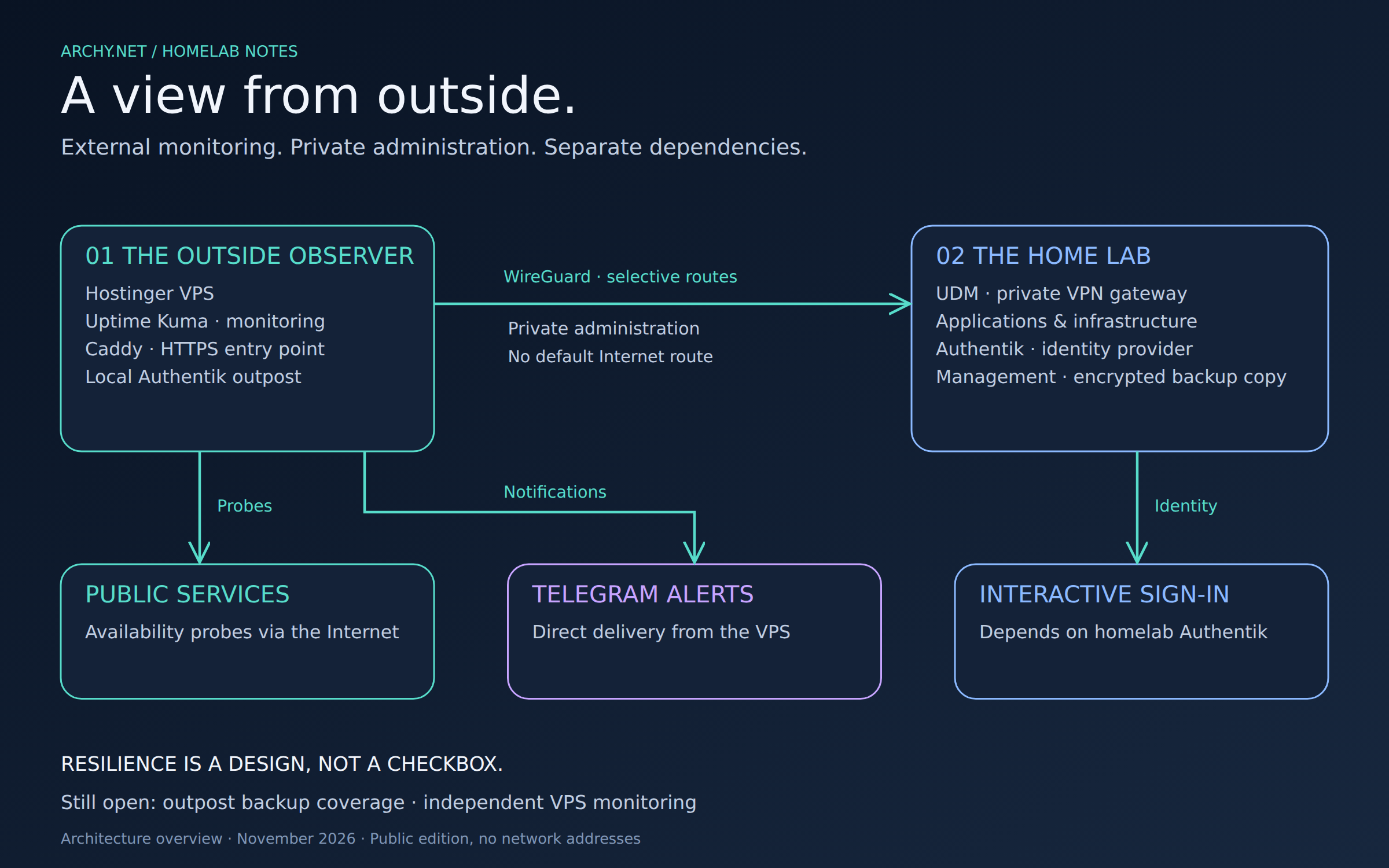
The Hostinger VPS runs Uptime Kuma behind Caddy and checks ten public HTTPS endpoints. That gives me a view I can't get from an internal check alone: whether a machine on the Internet can reach the public entry point. I still want internal monitoring. The two views answer different questions.
Public probes and Telegram notifications use the VPS's own Internet connection. They don't travel back through my home network. Sending them through the lab would rather defeat the point of putting Kuma elsewhere.
I also grouped the checks to reduce the flood of notifications during a broad outage. A temporary monitor went through an UP, DOWN, UP cycle before I removed it. That checked the alert path; it wasn't a simulation of every way the lab could fail.
WireGuard gives me a private way in
The UDM is the WireGuard server, and the VPS connects to it as a client. Only selected routes use the tunnel. There is no default route sending the VPS's Internet traffic through the house.
That lets my management machine administer the VPS privately while Kuma keeps doing its public checks independently. A persistent keepalive helps maintain the tunnel through stateful network equipment. I kept the hosting provider's console available too. When the remote access path is the thing that breaks, having another way in matters.
Keep the public surface small
SSH uses a dedicated administration account and a key. Root SSH login and password authentication are disabled, and the firewall limits SSH access to the management machine over the VPN. Caddy is the public web entry point; Kuma listens on loopback.
Automatic OS security updates are enabled, without automatic reboots. Container updates still need a backup and a maintenance plan. I don't consider them handled just because the operating system can patch itself.
Authentik protects the interface, with a catch
I put a dedicated Authentik proxy outpost on the VPS and connected it to Caddy's forward-auth check. The outpost is local-only, and access is limited to the administrator group. This leaves the shared outpost for the other applications alone.
Authentik gets me through the front door, but Kuma still asks for its own login. This isn't native single sign-on. I checked the redirect to Authentik and the protection of both the dashboard and Socket.IO paths against anonymous access.
The catch is that Authentik runs at home. If the lab is down, signing into the monitoring interface can be affected too. The probes and direct Telegram notifications don't depend on that login path, so they can continue. For recovery, I have the provider console and, when VPN administration works, a local SSH tunnel.

One place to read alerts
I moved infrastructure alerts into a dedicated Telegram conversation: internal and external Kuma, Graylog operational and security alerts, Grafana, infrastructure checks, scheduled-task monitoring. Regular reports and project discussions stay in their own conversations.
What changed is the destination, not the delivery architecture. The external Kuma instance still sends directly from the VPS. I haven't added an automation machine inside the lab as a relay that everything must pass through.
A backup copy off the VPS
Kuma now has a daily local backup, with seven archives retained. The management machine pulls an encrypted copy back to the lab and keeps fourteen archives. I decrypted the first copy and checked the SQLite database's integrity successfully.
I still need to test a complete restore. A readable archive and a healthy database are a good start, but they don't prove I can bring the application back. The second copy also lives at home, not in an independent cloud location. And the new Authentik outpost configuration still needs to be added to the backup scope.
What I still need to finish
First, I need to include the outpost in the backup set and test a full restore. After that, the VPS needs an independent observer of its own. It cannot send a message after it has disappeared.
Heartbeats for backups and scheduled jobs are also on the list, along with selected DNS, certificate and application-level checks and a minimal public status page. None of those should be read as deployed features yet.
For now, I have an external view of the public services and a less scattered place to read alerts. The remaining dependency on the home identity provider is visible, and so are the recovery gaps. That's a more useful starting point than a dashboard that looks green only from inside the house.
The updated homelab diagrams show the new components alongside the older inventory snapshots, with their dates retained. IP addresses are hidden and service endpoints use placeholders. The topology is enough to explain the design.