
When people compare Parallels RAS and Citrix Virtual Apps and Desktops, they usually start with features, licensing, user experience, or how painful the admin console feels on a Tuesday afternoon.
That is useful, but it misses a quieter signal: release cadence.
How a vendor ships fixes tells you a lot about the operational model you are buying into. Not just how often you get shiny features, but how security fixes are packaged, how easy it is to know what "current" means, and how much calendar discipline you need around upgrades.
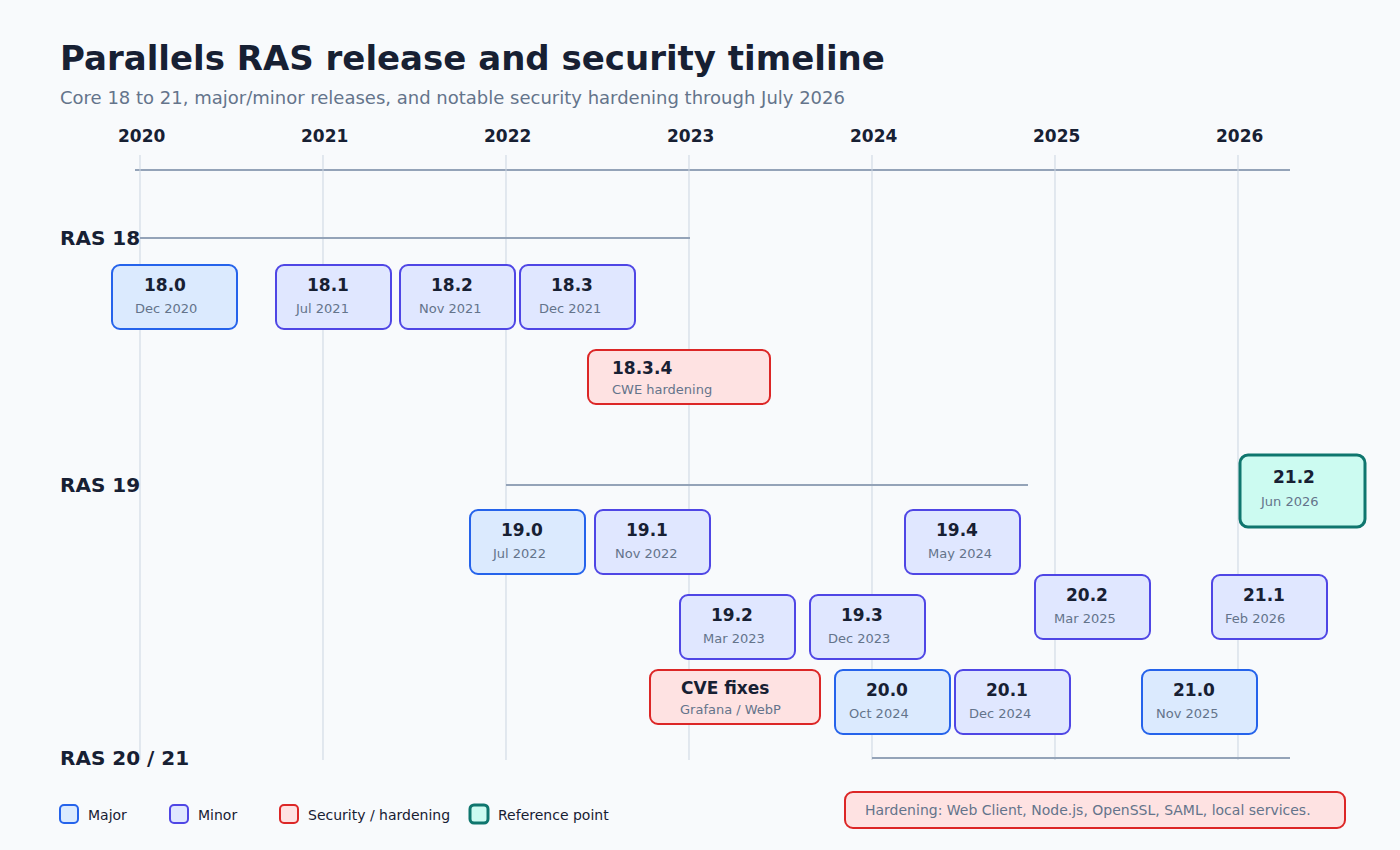
I recently built a timeline of Parallels RAS releases from version 18 through 21, including security-related fixes across the Core product, Web Client, Windows Client, Browser Plugin, HALB, and Performance Monitor. Then I looked at it next to the Citrix CVAD rhythm.
The comparison is interesting because these two products do not behave like the same species.
The Short Version
Parallels RAS feels like a product with fewer moving public tracks. Major and minor releases arrive, patches cluster around them, and security hardening often lands as part of regular maintenance builds.
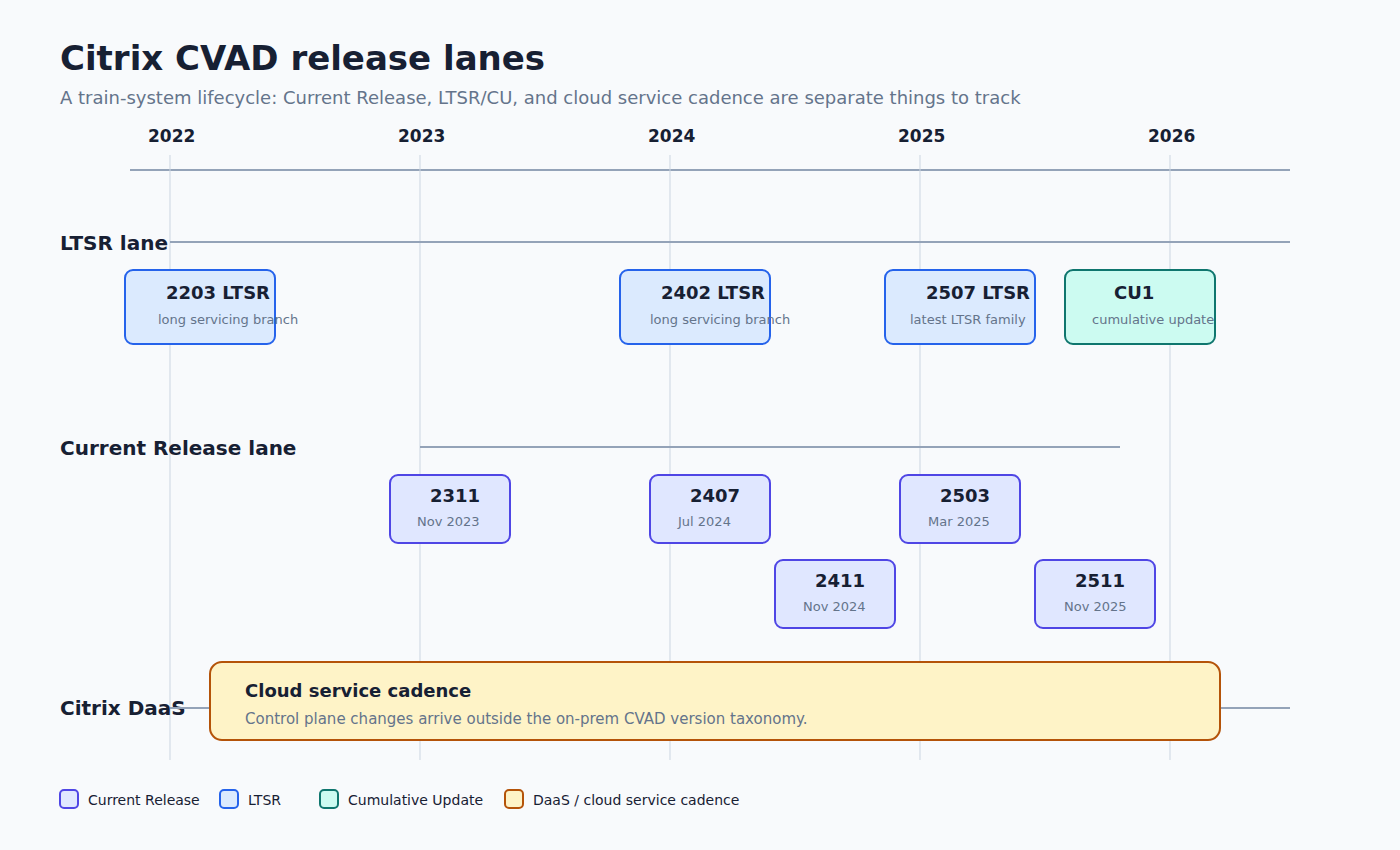
Citrix CVAD is more formalized. It has Current Release versions, LTSR branches, Cumulative Updates, and a separate Citrix DaaS cloud rhythm. That gives customers more lanes, but also more bookkeeping.
Neither model is automatically better. They create different operational habits.
| Topic | Parallels RAS | Citrix CVAD |
|---|---|---|
| Main rhythm | Major/minor branches with maintenance builds | Current Release, LTSR, CU, and DaaS channels |
| Upgrade reading | Follow the active RAS branch and component builds | First identify the channel, then the release family |
| Security signal | Often embedded in release notes as component hardening | Split across CVAD release notes, LTSR/CU notes, Workspace app, Gateway, StoreFront, and cloud updates |
| Operational burden | Lower taxonomy, but you must check all RAS components | Higher taxonomy, but clearer long-term servicing concepts |
| Best fit | Smaller teams that want a simpler lifecycle | Larger estates that need formal servicing lanes |
What The Parallels Timeline Shows
From RAS 18 to RAS 21, the cadence is fairly readable:
| Branch | First release | Last observed Core build | Rough active window |
|---|---|---|---|
| RAS 18 | December 2020 | March 2023 | 2020-2023 |
| RAS 19 | July 2022 | November 2024 | 2022-2024 |
| RAS 20 | October 2024 | April 2026 | 2024-2026 |
| RAS 21 | November 2025 | June 2026 | 2025-2026 |
The first thing that jumps out is overlap. RAS 19 continues after RAS 20 appears. RAS 20 continues after RAS 21 appears. That is good for real environments, because nobody sane wants to upgrade a remote access platform the day a major version drops.
The second thing is patch clustering. You see bursts around active branches: 19.4.x in 2024, 20.2.x through 2025 and early 2026, then 21.1.x and 21.2 in 2026.
The third thing is that security fixes are not always presented as big CVE-labeled events. Some are explicit, like CVE-2020-35710, CVE-2023-3128, CVE-2023-4863, or CVE-2024-3596. But a lot of the important work is described as hardening: OpenSSL upgrades, Node.js security releases, CSP improvements, SameSite cookies, CSRF fixes, Cross-Site WebSocket Hijacking mitigation, SAML decompression limits, local privilege escalation hardening, and service path corrections.
That matters. If your patch process only reacts to CVE numbers, you will miss meaningful risk reduction in Parallels RAS.
The Hidden Gotcha: Components
With Parallels RAS, "we are on 21.2" is not the whole answer.
You still need to check the Core build, Windows Client, Web Client, HALB, Performance Monitor, Enrollment Server, and any gateway-side pieces that users actually touch.
The July 2026 Windows Client security patch is a good example. The Core 21.2 release arrived in June 2026, but the Windows Client 21.2.0.1 security hardening followed on July 8. If you only look at the Core version, you can think you are done when one exposed or client-side component still needs attention.
That is not a Parallels-only problem. Citrix has the same pattern with Workspace app, Gateway, StoreFront, VDA, Delivery Controllers, Profile Management, WEM, and other moving parts. But Citrix customers tend to expect that sprawl. In Parallels, the product feels simpler, so the component drift can be easier to underestimate.
Citrix Is A Train System
Citrix CVAD is not just "one product version".
The public documentation currently shows several release families side by side: 2311, 2402 LTSR, 2407, 2411, 2503, 2507 LTSR, and 2511 Current Release. For LTSR, Citrix then adds Cumulative Updates. Citrix DaaS has its own cloud service release flow.
So the first question in Citrix is not "what version are we on?" It is:
Are we on a Current Release path, an LTSR path, a cloud DaaS path, or some hybrid reality with cloud control plane and on-prem components?
That sounds bureaucratic, but it is useful. LTSR gives conservative environments a stable servicing lane. Current Release gives faster access to platform changes. DaaS shifts part of the control plane cadence to Citrix.
The cost is mental overhead. You need a release map, not a single version number.

The Practical Difference
Parallels RAS gives you a simpler-looking lifecycle. That is one of its strengths. For many environments, especially where the goal is to publish apps cleanly without inheriting the full Citrix ecosystem, this is attractive.
But simpler-looking does not mean "set and forget".
The RAS timeline shows steady security hardening in 2024, 2025, and 2026. Web-facing code, Node.js, OpenSSL, SAML handling, authentication flows, local services, installer privilege boundaries: all of these changed. That is exactly the kind of surface you do not want aging quietly behind a login portal.
Citrix, on the other hand, makes the lifecycle more explicit. The release train is heavier, but the operating model is clearer for large estates: choose your lane, track your CUs, validate Workspace app separately, and document exceptions.
In other words:
- Parallels RAS is easier to read until you forget to check every component.
- Citrix CVAD is harder to read, but harder to pretend is simple.
That second point is annoying, but operationally healthy.
My Patch Policy From This
For Parallels RAS, I would not wait for dramatic advisories. I would run a quarterly review of release notes, plus an immediate review when a build mentions Web Client, Gateway, OpenSSL, Node.js, SAML, authentication, installer behavior, or local privilege escalation.
For Citrix CVAD, I would formalize the lane first:
- LTSR estates: track Cumulative Updates and client-side/security components separately.
- Current Release estates: plan recurring validation windows because the release rhythm is faster.
- DaaS estates: monitor service changes, but do not forget on-prem VDAs, connectors, Workspace app, and edge components.
For both vendors, the boring rule wins: inventory the components users actually hit, not just the headline version shown in the admin console.
Final Take
Parallels RAS looks calmer than Citrix CVAD. In many ways, it is.
But the release history still tells a clear story: RAS is actively hardened, web components move, client components move, and security fixes do not always arrive with a loud CVE sticker on the box.
Citrix makes you manage a more complex release taxonomy. Parallels makes it easier to believe there is less to manage.
That is the real comparison.
Not "which one patches more often?"
The better question is: which cadence matches the discipline your team can actually sustain?
Sources
- Parallels RAS 18 Release Notes: https://kb.parallels.com/en/125075
- Parallels RAS 19 Release Notes: https://kb.parallels.com/en/129018
- Parallels RAS 20 Release Notes: https://kb.parallels.com/en/130242
- Parallels RAS 21 Release Notes: https://kb.parallels.com/en/131037
- Citrix Virtual Apps and Desktops documentation: https://docs.citrix.com/en-us/citrix-virtual-apps-desktops/
- Citrix CVAD 2507 LTSR documentation: https://docs.citrix.com/en-us/citrix-virtual-apps-desktops/2507-ltsr/