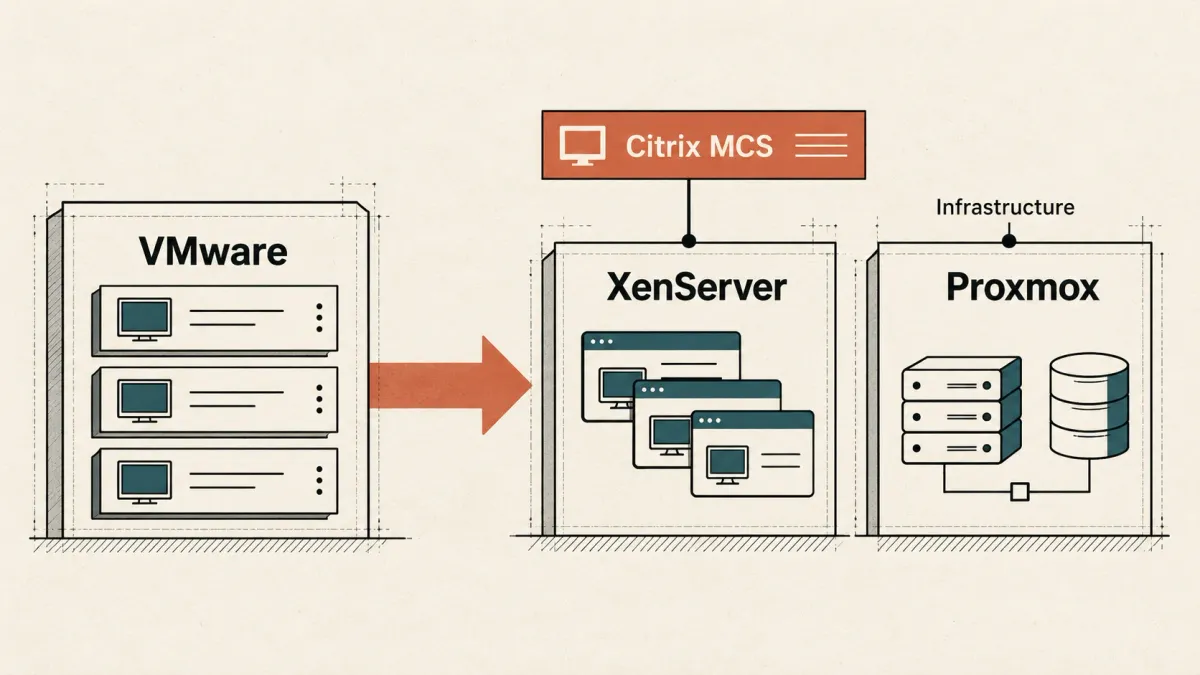
The renewal lands, the price gets everyone’s attention, and someone asks the obvious question: “Could we move this to Proxmox?” In a Citrix environment, my next question would be: “What happens to MCS?”
Getting a Windows VM to boot on another hypervisor is only the beginning. The real test comes on patch night: can I publish a new image, bring the desktops back, and undo the change if an application breaks? That is the part I want to preserve, not just the virtual disks.
This article explores the paths available to Citrix DaaS and on-premises CVAD teams that want to leave VMware without losing the provisioning workflow they rely on. There is no universal replacement to recommend. The aim is to understand what each option preserves, what it adds, and how easily you could change direction again.
First, the requirements that decide the shortlist
Before I look at pricing, I want a few answers:
- The exact Citrix release and cumulative update. A platform supported by DaaS is not automatically supported by an older on-premises LTSR.
- The supported hosting connection and management stack. Hyper-V through SCVMM is not the same proposition as a standalone Hyper-V server. Nutanix Prism Element and Prism Central are not interchangeable connection types.
- The functions the estate actually uses. MCS provisioning, image updates, power management, full clones, non-persistent catalogs, caching, GPU and disaster recovery need separate checks. A support-matrix entry is not a feature-parity guarantee.
- The guest and hardware combination. Windows version, VDA, guest tools, firmware, Secure Boot, vTPM, storage and GPU drivers must work together. Windows 11 and GPU desktops deserve their own compatibility review.
- The surrounding services. Profiles, application data, identity, backup, monitoring and recovery remain part of the design, even when MCS desktops themselves are disposable.
The support snapshot below was checked against Citrix CTX131239 on 28 October 2026. Recheck that living matrix before procurement. “Supported” here means a documented combination exists, not that every version or feature is included.
DaaS and on-premises CVAD: separate decisions
DaaS does not mean “move all the desktops to Azure.” The Citrix control plane is cloud-hosted, but the session hosts can stay in your data center on a supported platform. That distinction is easy to lose in a VMware-exit discussion.
With on-premises CVAD, you still run the control plane. Your installed release and cumulative update matter: an integration available in DaaS today may not exist in the LTSR you are running. The product name alone is not enough to establish compatibility.
For DaaS, check the resource-location architecture and the required Cloud Connectors or documented connectorless path. For CVAD, check Controllers, management components and any required provider plug-ins. Neither model makes the hypervisor management API, certificates or service-account permissions somebody else's problem.
What MCS needs beyond a running VM
MCS is easy to take for granted when it works. You maintain an image, create machines from it, roll out updates and let the hosting integration handle the necessary platform operations. Underneath, that depends on a supported provider that understands the destination’s resources, disks and VM lifecycle.
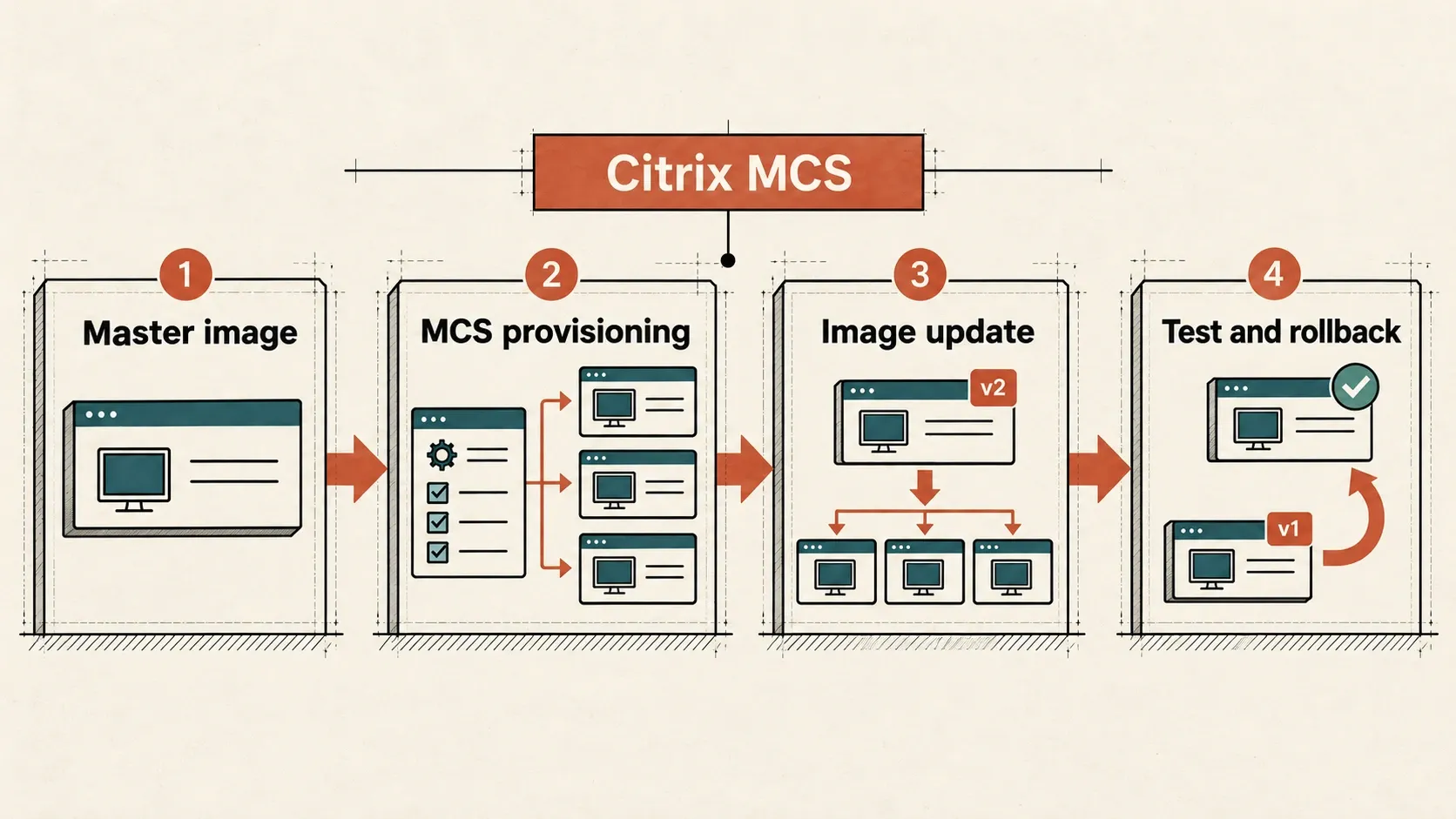
A VDA registering from a manually created VM is a useful first test. It tells me the machine can talk to Citrix. It does not tell me that MCS can build the next hundred machines, update their image or recover cleanly from a failed rollout.
I would also avoid carrying VMware storage assumptions across unchanged. Image preparation, clone mechanisms, temporary disks and caching vary by provider. MCS I/O optimization is not a universal setting to copy from one hypervisor to another.
XenServer: the first comparison for a Citrix-focused estate
For a Citrix-heavy estate, XenServer is where I would start the comparison. It is a straightforward candidate when the goal is to remove vSphere without redesigning the whole provisioning model at the same time.
The current matrix lists XenServer 8.4 and 9 for DaaS and several supported CVAD branches. That is a starting point, not permission to ignore lifecycle, hardware certification or the precise Citrix build.
The attraction is the fit with Citrix. The homework is less glamorous: will the existing storage work well, what happens to backup, who will operate it, and are the GPU and hardware combinations supported? None of those questions disappears because the hosting connection is familiar.
Citrix currently states that XenServer entitlements are included with UHMC and CPL licenses. I would verify the actual contract and permitted usage rather than translating that into “the hypervisor is free.” Existing entitlements can change the economics considerably, but they do not remove operating costs.
Nutanix AHV: a strong option, with a connection-type trap
If Nutanix is already in the data center, AHV deserves a serious look. If it is not, this becomes a platform purchase as much as a hypervisor decision. Either way, the Citrix support story depends on the management connection you actually use.
The older Prism Element path and the newer Prism Central integration have different prerequisites. For on-premises Prism Element deployments, Citrix documents installation of the Nutanix plug-in on the relevant Delivery Controllers. Do not apply that procedure blindly to every newer Prism Central connection.
The current matrix gives broader Prism Central support to CVAD 2507 LTSR CU1 and later branches, while older rows carry restrictions, including NC2-on-Azure-specific cases. A “Yes” with a footnote is not a generic approval for an on-premises cluster.
The Nutanix connection documentation also distinguishes connection types whose names look deceptively similar. I would record the exact endpoint, AOS/Prism versions and provider before designing the catalogs.
Microsoft Hyper-V: include SCVMM in the price and design
Hyper-V is still an option. Just do not price it as “we already have Windows Server, so we are done.” The Citrix MCS integration discussed here goes through System Center Virtual Machine Manager. SCVMM is part of the solution, and someone has to license, maintain and recover it.
The current matrix lists SCVMM 2022 for DaaS and several CVAD branches. SCVMM 2025 is listed for DaaS and newer CVAD branches, but not CVAD 2203 LTSR. Check the corresponding Hyper-V host, Windows Server and SCVMM compatibility requirements as well.
The Citrix SCVMM connection guide requires an account able to create VMs and explicit selection of the target cluster or standalone host.
OpenShift Virtualization: now a documented candidate
OpenShift Virtualization now belongs in this conversation too. The current Citrix matrix lists OpenShift 4.19 and 4.20 for DaaS and CVAD 2507 LTSR, 2603 and 2607 LTSR. That makes it a documented candidate, not just an interesting lab experiment.
But “KVM underneath” does not make every KVM platform equivalent. This support applies to the documented OpenShift combination and its integration, not to an arbitrary Kubernetes cluster or a standalone KVM host.
I would examine VM storage and cloning capabilities, network attachment, Windows guest integration, permissions, image preparation and the exact Citrix feature limitations before accepting the design. Kubernetes skills alone are not a substitute for Windows VDI operations; vSphere skills alone are not a substitute for running OpenShift.
Azure Local: keep it separate from generic Hyper-V
Azure Local is another documented route. CTX131239 points to support in CVAD 2507 and later and directs readers to the release-specific system requirements.
I would not turn that statement into blanket compatibility for every Azure Local release, every DaaS connection or every MCS capability. Validate the exact deployment path, Azure dependencies, guest licensing and supported provisioning operations.
What about Proxmox and XCP-ng?
I understand the appeal of Proxmox and XCP-ng. The problem is not whether they are interesting VMware alternatives. It is whether they can preserve the Citrix workflow you need with a support commitment behind it. Shared KVM or Xen ancestry does not establish that.
Neither Proxmox nor XCP-ng appears as a supported platform in the Citrix matrix checked for this article. A community integration, external automation or a successful VDA demonstration does not establish native Citrix MCS support.
An externally provisioned, non-power-managed catalog may be a different architecture to investigate, subject to explicit guest, VDA and vendor support confirmation. It gives up or replaces parts of the lifecycle rather than magically preserving them.
Want Proxmox, but need to keep MCS? Split the transition
For the team saying “we want Proxmox, but we cannot give up MCS,” I would put a split design on the table: Proxmox for general infrastructure, and a separate XenServer pool for the Citrix session hosts. You do not have to settle the next ten years of application delivery before you can leave VMware.
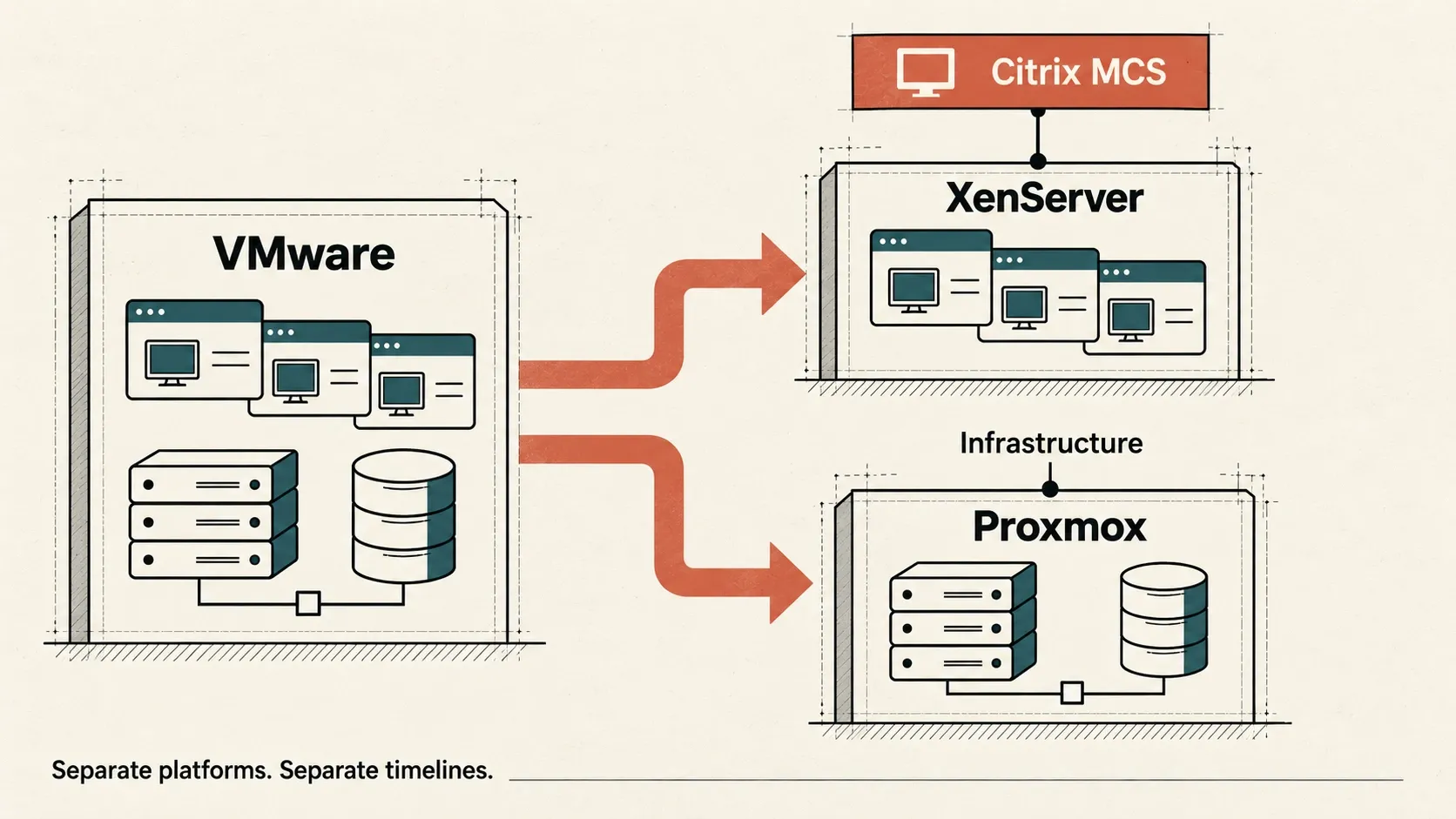
A hypervisor exit is already enough work. Adding a broker replacement to the same deadline makes the project harder to test and harder to reverse. Keeping Citrix on XenServer lets DaaS or on-premises CVAD continue provisioning desktops and application servers through a supported MCS connection while the rest of the infrastructure moves at its own pace.
- Proxmox: general-purpose infrastructure VMs, with guest OS and application support checked independently.
- XenServer: Citrix workloads provisioned through MCS, using the supported Citrix, XenServer, Windows and hardware combination.
- Citrix DaaS or CVAD: the existing delivery model remains in place while the organization evaluates its longer-term options.
These are two real platforms with their own capacity and operating procedures, not XenServer nested inside Proxmox. Check support separately for any customer-managed Citrix infrastructure components before choosing where to host them.
The XenServer license is already included for eligible Citrix subscriptions
There is a useful licensing detail here. XenServer is included for Citrix workloads with Citrix for Private Cloud, Universal Hybrid Multi-Cloud, Universal MSP and Citrix Platform License subscriptions. If that is the subscription you already own and the workload is covered, you do not need to buy another XenServer license for this part of the transition.
I would still check the actual entitlement and activate the required Premium Edition rights. Older contracts are not automatically covered, and running two platforms still takes hardware, storage and staff time. But for an eligible subscription, the XenServer license is already paid for. The licensing overview explains the scope and activation requirements.
Buy time, not a dependency on an unannounced connector
What this buys is time. You can finish the VMware exit without betting the project on a Proxmox connector that is not available to you, and without rushing users onto a different delivery platform just to meet a renewal date.
Perhaps Citrix will eventually provide a supported Proxmox connector. That would be worth revisiting. For now, I have no verified announcement or delivery date to build a plan around. A future connector is an option to watch, not a project dependency.
Or you may decide that the next step is a different delivery product. Parallels RAS is one candidate I would investigate, but I would be precise about “Proxmox-ready”: the official RAS 21 provider list checked for this update does not list Proxmox. I would need vendor confirmation for the intended release before promising native provisioning or power management.
Publishing applications from Windows servers that somebody else provisions is not the same as managing Proxmox as a native VDI provider. I would test the actual image, power, profile and user-experience workflow before choosing. And moving to RAS means replacing the Citrix provisioning model, not taking MCS with you.
PVS is an alternative provisioning model, not a support shortcut
PVS sometimes comes up as the escape route: stream the image instead of letting MCS create it. That changes image delivery, but it does not conjure up a supported hosting connection or power-management provider. Those are still separate questions.
Check PVS target support, boot and firmware requirements, network resilience, write-cache placement and provisioning integration independently. The matrix has separate PVS sections for a reason.
I would consider PVS for its operational merits, not as a way to bypass a missing MCS support entry.
Migrate catalogs, not just virtual disks
For pooled MCS desktops, I would normally build a destination-specific master image and a new catalog alongside the old one. A disk converter can help get an image across. It does not transfer MCS catalog ownership and metadata just because Windows boots successfully afterward.
Persistent desktops need a separate data and identity migration plan. Across both models, remove obsolete guest tools carefully, install the destination integration components, and validate activation, security agents, applications and profile access.
Before moving users, I would require evidence that the destination can:
- Create and remove machines reliably, including the intended AD account lifecycle.
- Publish an image update and return to a known-good image using the supported workflow.
- Handle boot and logon bursts with representative profiles and applications.
- Perform the required power actions and capacity scheduling.
- Survive host maintenance and the failure scenarios the service is designed to tolerate.
- Recover persistent user data and required management services within the agreed targets.
I would keep the old catalog available until the checks pass and a representative group of users has worked on the destination. The first successful login is a milestone. It is not the point at which I would remove the way back.
Several routes, not one replacement to buy
If keeping MCS is the priority, XenServer, AHV, Hyper-V with SCVMM, and the documented OpenShift or Azure Local combinations offer different paths to investigate. The right shortlist depends on existing skills, hardware, storage, support requirements and the Citrix release in use. It should not start with a new vendor’s promise that one platform solves everything.
If Proxmox is the longer-term infrastructure direction, a separate XenServer pool for Citrix workloads can be a bridge. Eligible Citrix subscriptions already include the relevant XenServer rights. That can make the transition easier to fund, but it still leaves a dependency on Citrix licensing and the MCS provider ecosystem. It is a way to separate decisions, not a claim of vendor independence.
If the delivery platform itself is open for review, use that breathing room to compare alternatives against real workloads and confirmed support. Parallels RAS is one candidate to assess, with the Proxmox integration caveat explained above. Replacing Citrix at the same time as VMware is a separate decision with its own costs and migration risks.
Staying temporarily on VMware can also be a deliberate option if a rushed migration would cost more than a bounded renewal. The important part is to use that time to reduce dependencies and prepare a tested exit, rather than postpone the same decision indefinitely.
Do not leave one lock-in just to buy another
No platform is free of dependencies. An open-source hypervisor can reduce one kind of commercial exposure while leaving you dependent on a storage design, a backup product, a broker integration or a handful of specialists. Conversely, a proprietary platform can be a reasonable choice if its terms are clear and the exit is practical. I would compare the dependencies, not just the labels.
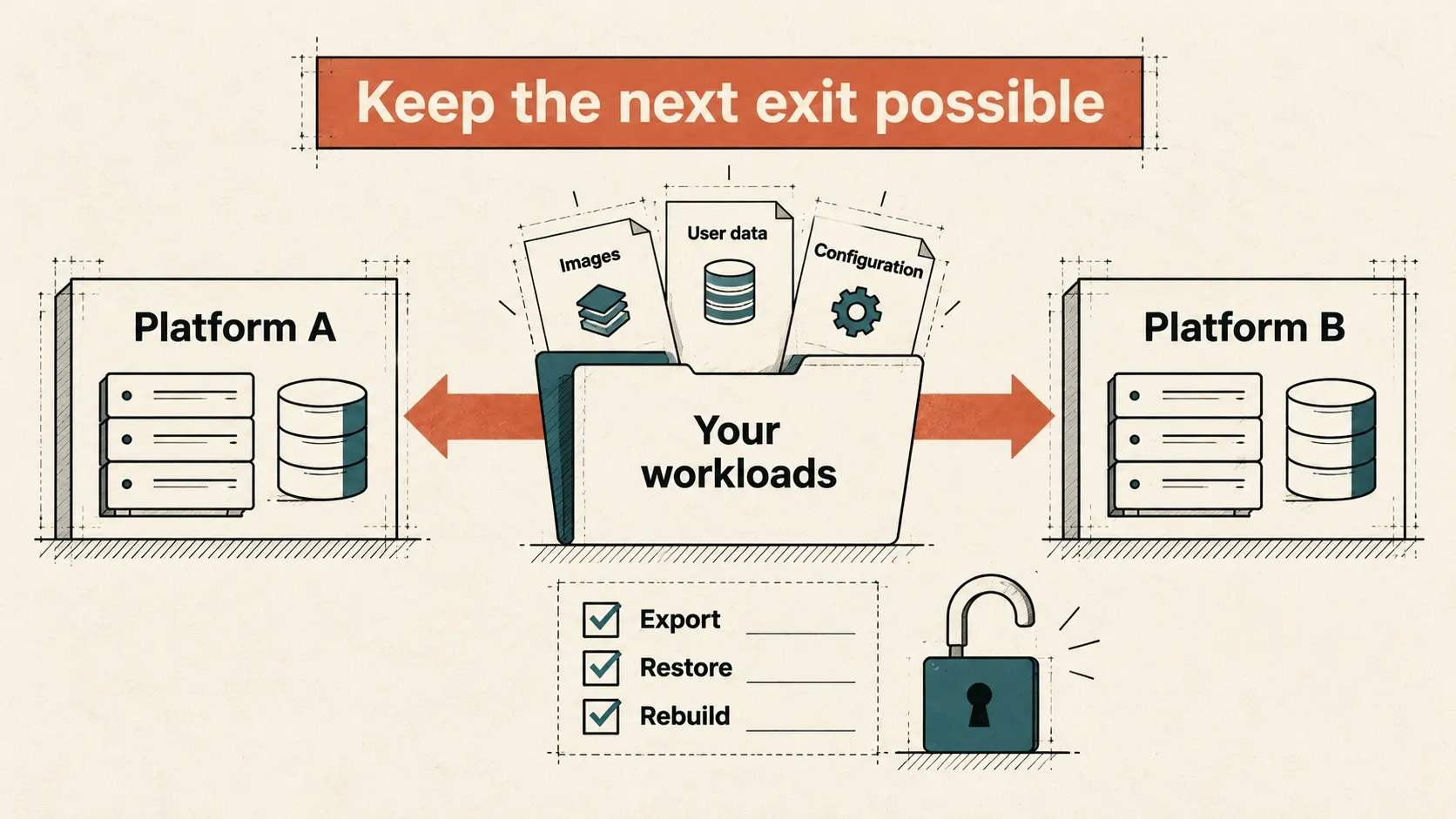
Before committing, I would ask each option the same questions:
- What happens at renewal? Check pricing units, minimum commitments, bundles, subscription terms and what remains usable if the contract changes or ends.
- Can I take my workloads and data elsewhere? Test image export and conversion, application rebuilds, profile portability and recovery without assuming that an export button preserves everything.
- Which parts tie me to this platform? Identify storage formats, cloning features, management APIs, GPU dependencies, automation and backup integrations that would need replacing.
- Who supports the complete chain? A guest OS, hypervisor and broker can each be supported individually without the exact combination being covered.
- What does the next exit cost? Include parallel capacity, staff time, retraining, downtime, data movement and replacement of platform-specific tooling, not just the first migration bill.
Keep master-image build instructions, application packages and configuration under your control. Prefer documented interfaces where they meet the need, retain recoverable copies of user data, and test an exit with a representative workload before the estate becomes difficult to move. Not every dependency can be removed; the useful ones should be deliberate and understood.
The goal is not to find a new platform to trust forever. It is to keep Citrix working today while preserving the ability to make a different decision tomorrow. A staged migration with known trade-offs is often more valuable than a clean-looking diagram that hides the next lock-in.