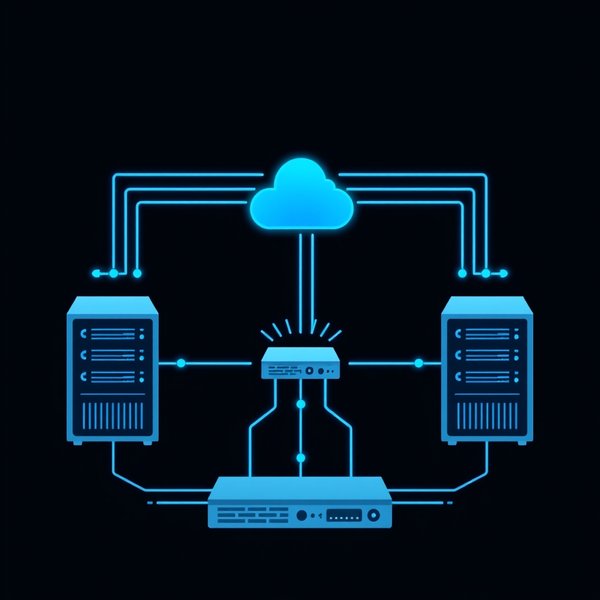

Managing patches across a fleet of servers is like trying to keep track of maintenance schedules for 21 different vehicles - you need to know what needs servicing (monitoring) AND you need a reliable way to perform that service (automation). Most organizations solve only one part of this equation, leading to either blind automation or manual, time-consuming patching processes.
In this article, I'll show you how PatchMon and Ansible AWX work together to create a complete, professional patch management solution that provides both visibility and automation.
The Patch Management Challenge
Before diving into the solution, let's understand the problem.
What Organizations Struggle With
Visibility Issues:
- Which servers have pending updates?
- Are there critical security patches waiting?
- How many packages need updating across the infrastructure?
- When was each server last patched?
Automation Challenges:
- How to patch without causing downtime?
- How to handle servers with different roles (database, application, DNS)?
- What about containerized workloads like Docker Swarm?
- How to verify patches were actually applied?
Compliance & Auditing:
- Proving patch compliance for security audits
- Tracking patch history over time
- Demonstrating rapid response to CVEs
- Maintaining audit trails
The Common Approaches (and Their Limitations)
Manual Patching:
# SSH to each server
ssh server01
sudo apt update && sudo apt upgrade -y
# Repeat 20 more times...
❌ Time-consuming
❌ Error-prone
❌ No visibility across infrastructure
❌ Doesn't scale
Automation-Only (e.g., unattended-upgrades):
# Set it and forget it
apt install unattended-upgrades
❌ No visibility into what's pending
❌ No control over when updates run
❌ Can't handle complex scenarios (Docker Swarm, custom scripts)
❌ Blind to failures
Monitoring-Only (manual application):
# Check monitoring dashboard
# See 15 servers need updates
# Still have to SSH and patch manually
❌ Still manual execution
❌ Time-consuming
❌ Inconsistent across environments
The Solution: PatchMon + AWX
The answer is combining the strengths of two specialized tools:
PatchMon = Your eyes (visibility and monitoring)
AWX = Your hands (automation and execution)
Together, they create a complete workflow:
┌──────────────┐         ┌──────────────┐         ┌──────────────┐
│   PatchMon   │         │  You Review  │         │     AWX      │
│   Dashboard  │ ──────> │  & Decide    │ ──────> │  Executes    │
│   (Monitor)  │  Shows  │   Action     │ Trigger │  (Automate)  │
└──────────────┘         └──────────────┘         └──────────────┘
       │                                                  │
       │                                                  │
       └────────────── Verify Results ────────────────────┘
Understanding PatchMon
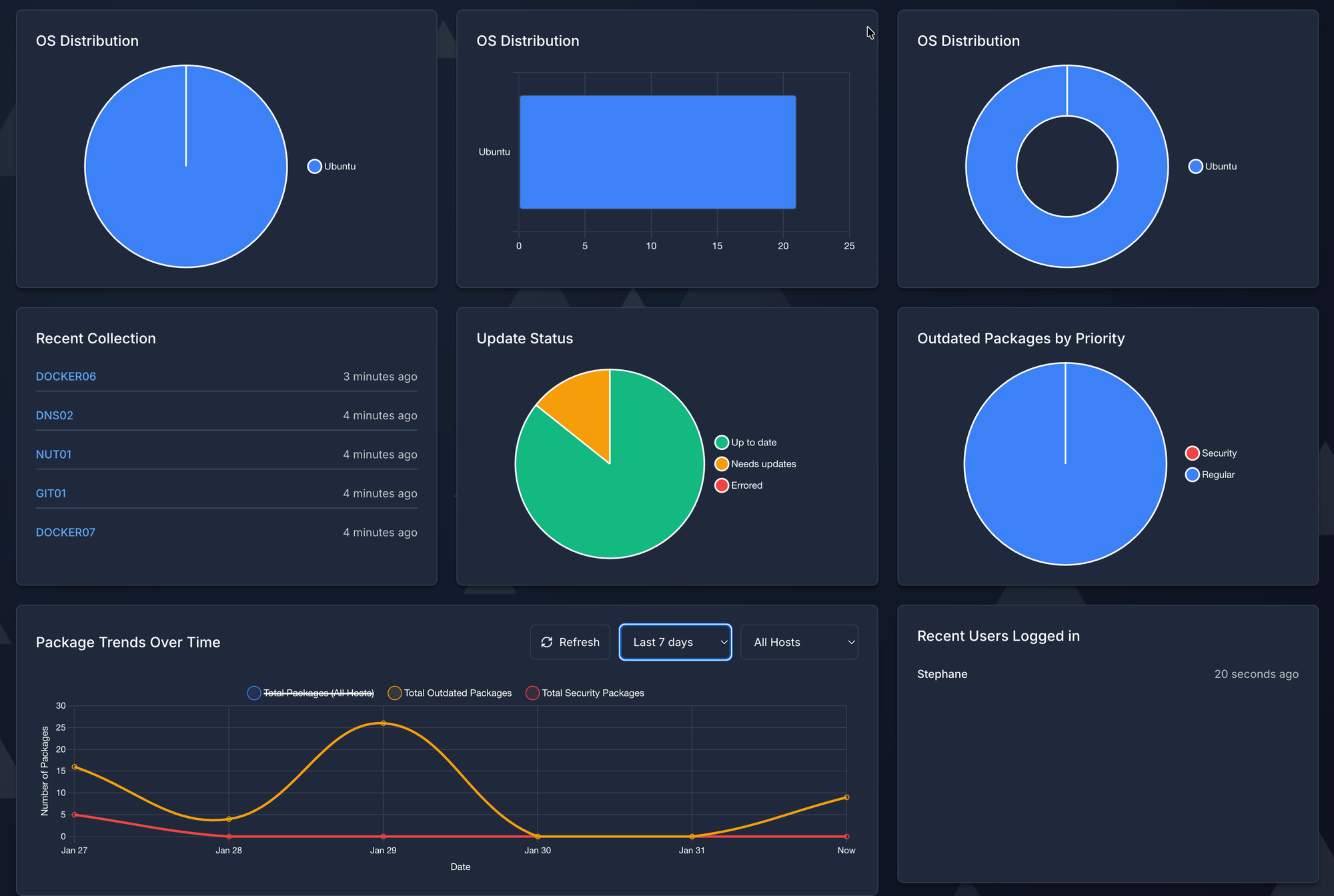
PatchMon is a lightweight, web-based monitoring dashboard that continuously tracks the patch status of your Linux servers.
What PatchMon Provides
Visual Dashboard:
- At-a-glance view of entire infrastructure
- Color-coded status (up-to-date, updates pending, critical patches)
- Grouping by environment, role, or custom tags
Package-Level Details:
- Drill down to see exactly which packages need updating
- Differentiate between security and regular updates
- View package versions (current vs. available)
Security Focus:
- Highlights critical security patches
- CVE tracking and correlation
- Priority-based alerting
Historical Data:
- Patching trends over time
- Compliance reporting
- Audit trail for who patched what and when
Multi-Platform Support:
- Ubuntu, Debian, RHEL, CentOS
- Agentless or agent-based monitoring
- REST API for integration
PatchMon's Strengths
✅ Passive Monitoring - Doesn't change anything, safe to run continuously
✅ Real-Time Status - Always current view of patch status
✅ Low Overhead - Minimal resource requirements
✅ Easy to Read - Non-technical staff can understand the dashboard
✅ Compliance Ready - Generates reports for audits
PatchMon's Limitations
❌ Doesn't apply patches (monitoring only)
❌ Doesn't handle complex update scenarios (Swarm, custom workflows)
❌ No built-in scheduling
❌ No integration with configuration management
This is where AWX comes in.
Understanding Ansible AWX
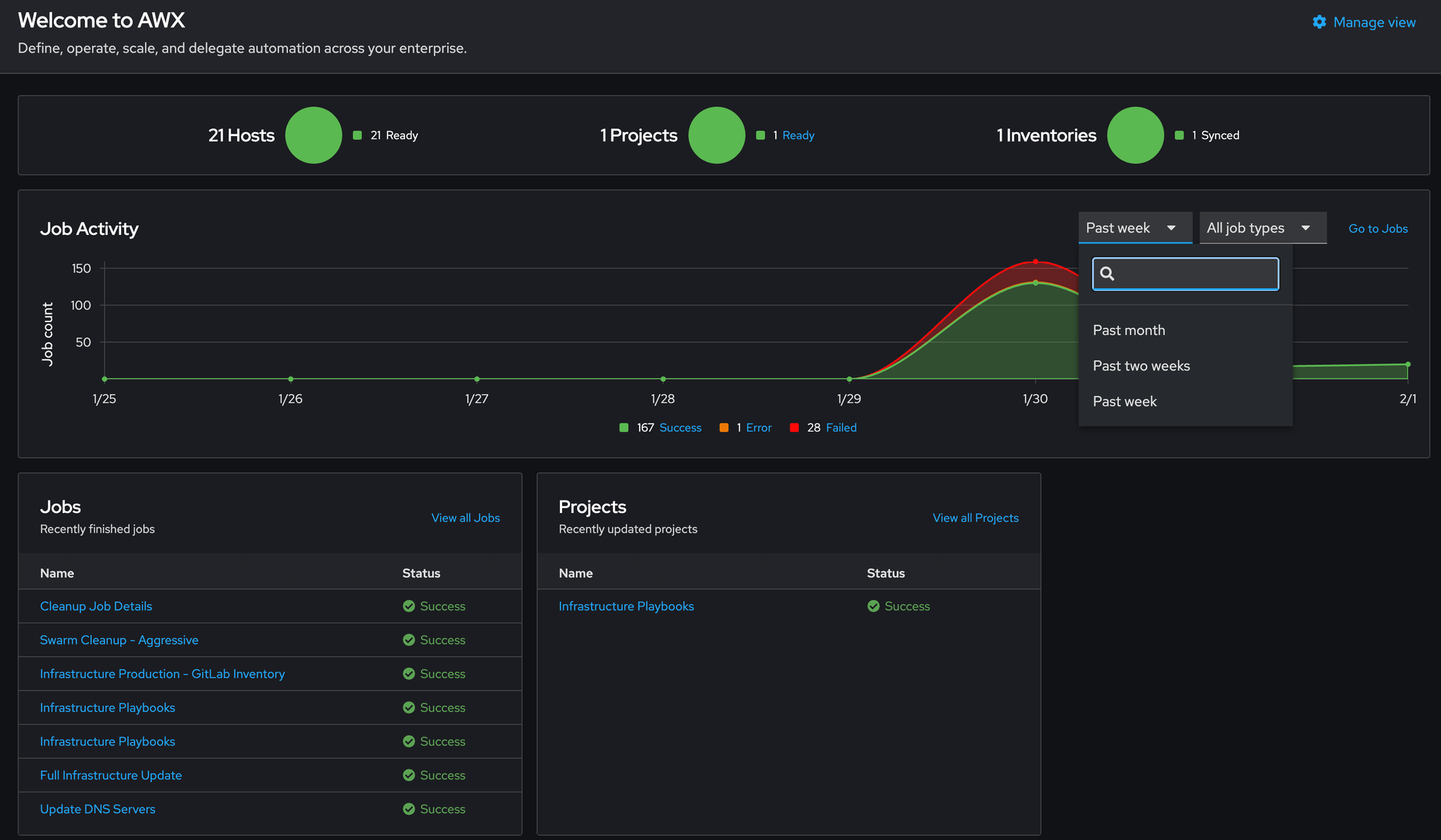
AWX is the open-source version of Ansible Tower - a web-based UI and automation platform for Ansible playbooks.
What AWX Provides
Automation Engine:
- Execute Ansible playbooks via web interface
- Schedule automated runs
- Parallel or sequential execution
- Conditional workflows
Centralized Management:
- Single interface for all automation
- Role-based access control (RBAC)
- Credential management (SSH keys, passwords)
- Inventory management
Complex Scenarios:
- Multi-step workflows
- Conditional execution (if X succeeds, do Y)
- Custom pre/post-update scripts
- Safe updates for clustered systems (Docker Swarm, Kubernetes)
Audit & Logging:
- Complete execution history
- Real-time log streaming
- Success/failure tracking
- Integration with logging systems
AWX's Strengths
✅ Powerful Automation - Handles complex update scenarios
✅ Safe Execution - Drain Docker Swarm nodes, sequential updates
✅ Customizable - Run custom scripts before/after updates
✅ Scheduled Automation - Set it and forget it
✅ GitOps Integration - Version-controlled playbooks
AWX's Limitations
❌ Doesn't show pending updates (execution only)
❌ Requires more infrastructure (Kubernetes/Minikube)
❌ Higher learning curve
❌ No built-in patch status monitoring
This is where PatchMon comes in.
Why They're Better Together
The Perfect Complement
PatchMon and AWX intentionally solve different problems, making them naturally complementary:
| Aspect | PatchMon | AWX |
|---|---|---|
| Primary Function | Monitor | Execute |
| Changes Systems | No | Yes |
| Complexity | Simple | Advanced |
| Resource Usage | Low | Moderate |
| Risk Level | Zero | Managed |
| User Interface | Read-only dashboard | Control panel |
| Information Flow | Servers → Dashboard | Dashboard → Servers |
The Complete Workflow
Here's how they work together in practice:
1. Continuous Monitoring (PatchMon)
PatchMon agent on each server checks for updates
     ↓
Reports to central dashboard
     ↓
Dashboard shows: "15 servers have pending updates,
                  3 critical security patches"
2. Review & Decision (Human)
Administrator checks PatchMon Monday morning
     ↓
Sees critical security patch for OpenSSL
     ↓
Decides: "Apply immediately to all servers"
3. Automated Execution (AWX)
Administrator launches AWX job template
     ↓
AWX executes playbooks safely:
  - Updates non-critical servers in parallel
  - Updates Swarm workers one-by-one (drain/activate)
  - Updates Swarm managers sequentially
  - Updates DNS servers last
     ↓
Runs custom post-update scripts
Reboots if needed (swarm-safe)
4. Verification (PatchMon)
30 minutes later, check PatchMon again
     ↓
Confirms: All servers now show "up to date"
     ↓
Critical security patch installed everywhere ✅
Real-World Scenario: Security Response
Let's walk through a real scenario to see the power of this combination.
Tuesday, 10:00 AM - Critical CVE Announced
A critical vulnerability is discovered in OpenSSL affecting all your Ubuntu servers.
Without PatchMon + AWX:
# SSH to each server individually
for server in server01 server02 server03 ... server21; do
    ssh $server
    # Check if vulnerable
    dpkg -l | grep openssl
    # Apply update
    sudo apt update && sudo apt upgrade openssl -y
    # Maybe reboot?
    sudo reboot
done
# Takes: 2-3 hours
# Errors: Probably miss a server or two
# Downtime: Uncoordinated reboots
# Verification: Manual checking
# Audit trail: Your bash history
With PatchMon + AWX:
10:05 AM - Check PatchMon:
Dashboard immediately shows:
  - 21 servers affected
  - OpenSSL security update available
  - Severity: CRITICAL
  - CVE-2024-XXXXX
10:07 AM - Review Impact:
PatchMon details:
  - Current version: 1.1.1f
  - Available: 1.1.1t (security fix)
  - Affected services: nginx, apache2, mysql
10:10 AM - Execute via AWX:
AWX → Templates → "Update All Infrastructure"
Click: Launch

AWX automatically:
  ✓ Updates all non-critical servers (parallel)
  ✓ Drains Swarm workers one-by-one
  ✓ Updates and reboots Swarm workers
  ✓ Reactivates Swarm workers
  ✓ Updates Swarm managers sequentially
  ✓ Updates HAProxy servers
  ✓ Updates DNS servers last
  ✓ Zero service interruption
10:45 AM - Verify in PatchMon:
Dashboard now shows:
  ✓ All 21 servers patched
  ✓ OpenSSL version: 1.1.1t
  ✓ CVE-2024-XXXXX: Resolved
  ✓ Compliance: 100%
10:50 AM - Report to Management:
Screenshot from PatchMon:
  "Critical security vulnerability patched across
   entire infrastructure in 35 minutes"

AWX logs provide complete audit trail
Results:
- Total time: 45 minutes
- Manual effort: 10 minutes
- Downtime: Zero (Docker Swarm safe updates)
- Errors: None
- Missed servers: None
- Audit trail: Complete
Integration Patterns
While PatchMon and AWX don't have direct integration, they work together through well-defined workflows:
Pattern 1: Scheduled Automation with Monitoring
Use Case: Regular weekly updates
Sunday 2:00 AM - AWX runs scheduled workflow
     ↓
Updates all servers automatically
     ↓
Monday 9:00 AM - Admin checks PatchMon
     ↓
Verifies all updates applied successfully
     ↓
If issues found → Investigate via AWX logs
Benefits:
- Set it and forget it automation
- Weekly verification via PatchMon
- Historical trend tracking
- Catch any failed updates
Pattern 2: On-Demand Execution
Use Case: Critical security patches
PatchMon alerts to critical patch
     ↓
Admin reviews severity in PatchMon
     ↓
Decides to patch immediately
     ↓
Launches specific AWX job template
     ↓
Verifies in PatchMon after completion
Benefits:
- Visibility-driven decisions
- Rapid response capability
- Controlled execution
- Immediate verification
Pattern 3: Staged Rollout
Use Case: Testing updates before production
PatchMon shows updates available
     ↓
AWX: Update dev servers first
     ↓
PatchMon: Verify dev servers updated
     ↓
Wait 24 hours, monitor for issues
     ↓
AWX: Update production servers
     ↓
PatchMon: Verify production servers updated
Benefits:
- Risk mitigation
- Gradual rollout
- Verification at each stage
- Rollback if needed
Pattern 4: Compliance Reporting
Use Case: Monthly security audit
Generate PatchMon report for month
     ↓
Shows patch compliance trend
     ↓
Export AWX execution logs
     ↓
Demonstrates automated patching process
     ↓
Submit to auditors with evidence:
  - When patches were applied
  - Success/failure rates
  - Current compliance status
Benefits:
- Automated evidence collection
- Historical compliance data
- Audit-ready reports
- Process documentation
Architecture Example
Here's what a typical PatchMon + AWX infrastructure looks like:
┌─────────────────────────────────────────────────────────────┐
│                     Management Network                      │
│                                                             │
│  ┌────────────────┐              ┌─────────────────┐        │
│  │   PatchMon     │              │      AWX        │        │
│  │   Dashboard    │              │  (Kubernetes)   │        │
│  │                │              │                 │        │
│  │  Web UI:       │              │  Web UI:        │        │
│  │  http://...:80 │              │  http://..:30080│        │
│  │                │              │                 │        │
│  │  - Monitors    │              │  - Executes     │        │
│  │  - Reports     │              │  - Automates    │        │
│  │  - Alerts      │              │  - Logs         │        │
│  └────────────────┘              └─────────────────┘        │
│         ↑                                  ↓                │
│         │                                  │                │
└─────────┼──────────────────────────────────┼────────────────┘
          │                                  │
          │ Status Reports                   │ Ansible Playbooks
          │ (Read-only)                      │ (Read/Write via SSH)
          │                                  │
┌─────────┴──────────────────────────────────┴─────────────────┐
│                    Production Servers                        │
│                                                              │
│  ┌──────────┐  ┌──────────┐  ┌──────────┐  ┌──────────┐      │
│  │ Server01 │  │ Server02 │  │ Server03 │  │  ...21   │      │
│  │          │  │          │  │          │  │          │      │
│  │ PatchMon │  │ PatchMon │  │ PatchMon │  │ PatchMon │      │
│  │  Agent   │  │  Agent   │  │  Agent   │  │  Agent   │      │
│  └──────────┘  └──────────┘  └──────────┘  └──────────┘      │
│       ↑              ↑              ↑             ↑          │
│       └──────────────┴──────────────┴─────────────┘          │
│                     Reports package status                   │
└──────────────────────────────────────────────────────────────┘
Practical Benefits
Let's look at real metrics from using this combination:
Before (Manual Patching)
Weekly Patching Window:
- Time required: 4-6 hours
- Servers patched: ~60% (time constraints)
- Critical patches: Applied within 48-72 hours
- Downtime: 15-30 minutes per server
- Audit trail: Spreadsheet notes
- Verification: Manual checks
- Compliance rate: ~60%
Monthly Metrics:
- Admin time spent: 20-25 hours
- Unpatched servers: 8-10 at any time
- Security incidents: 1-2 related to unpatched systems
- Audit findings: "Inconsistent patching process"
After (PatchMon + AWX)
Weekly Patching Window:
- Time required: 5 minutes (monitoring)
- Servers patched: 100% (automated)
- Critical patches: Applied within 30 minutes
- Downtime: Zero (Swarm-safe updates)
- Audit trail: Complete in AWX
- Verification: Automatic via PatchMon
- Compliance rate: 100%
Monthly Metrics:
- Admin time spent: 2-3 hours (monitoring only)
- Unpatched servers: 0 consistently
- Security incidents: 0 related to patching
- Audit findings: "Exemplary automated process"
Common Workflows
Daily Morning Routine
# 9:00 AM - Start of day

1. Open PatchMon dashboard
2. Quick visual scan: Any red (critical)?
3. If yes → Check details → Launch AWX if urgent
4. If no → Continue with day
5. Weekly: Review trends, plan actions

Time: 2-3 minutes
Weekly Scheduled Updates
# Saturday 11:00 PM - Automated

1. AWX scheduled job runs automatically
2. Updates all servers (except during active incidents)
3. Handles reboots, Swarm draining, custom scripts
4. Logs everything

# Monday 9:00 AM - Verification

1. Check PatchMon: All servers green?
2. If not → AWX logs show why
3. Fix issues, re-run if needed
4. Export weekly report

Time: 5 minutes manual
Critical Security Response
# Anytime - Security Alert

1. Check PatchMon: Which servers affected?
2. Review severity and impact
3. Launch appropriate AWX job:
   - Single server
   - Group of servers
   - All infrastructure
4. Monitor AWX execution in real-time
5. Verify in PatchMon
6. Export report for documentation

Time: 15-30 minutes end-to-end
Monthly Compliance Review
# Last day of month

1. PatchMon: Generate monthly report
   - Compliance percentage
   - Patch lag metrics
   - Critical patches applied
   - Trend analysis

2. AWX: Export execution logs
   - Number of runs
   - Success rate
   - Servers patched
   - Issues encountered

3. Combine into compliance report
4. Submit to security team

Time: 30 minutes
Advanced Use Cases
Multi-Environment Management
Scenario: Dev, Staging, Production
PatchMon Setup:
Dashboard grouping:
  - Development (auto-update, aggressive)
  - Staging (weekly, test zone)
  - Production (controlled, conservative)
AWX Workflow:
Monday: Update Development → Verify in PatchMon
Wednesday: Update Staging → Verify in PatchMon
Saturday: Update Production → Verify in PatchMon
Benefits:
- Catch issues in dev before production
- Test updates in staging
- Controlled production rollout
- Same tools across all environments
Compliance-Driven Patching
Scenario: Security audit requires 48-hour patch SLA
PatchMon Alerts:
Critical security patch detected
     ↓
Alert sent immediately
     ↓
Must be applied within 48 hours
AWX Response:
Auto-schedule job for next maintenance window
If >40 hours old → escalate to manual review
If >48 hours → emergency patch job
Reporting:
PatchMon generates:
  - Time-to-patch metrics
  - SLA compliance percentage
  - Exception reports
  - Audit-ready evidence
Disaster Recovery Validation
Scenario: Verify DR servers are patched
Monthly Test:
1. PatchMon: Check DR server status
2. AWX: Run update playbook on DR
3. PatchMon: Verify DR matches production
4. Report: DR readiness confirmed
Benefits:
- DR servers stay current
- Validate automation works in DR environment
- Ensure DR isn't forgotten
- Audit trail for DR compliance
Conclusion
PatchMon and AWX together create a patch management solution that rivals enterprise commercial offerings while giving you complete control and customization.
What You Get
Visibility (PatchMon):
- Know what needs patching, always
- Track compliance over time
- Generate audit reports
- Monitor trends and patterns
Automation (AWX):
- Patch safely and automatically
- Handle complex scenarios (Swarm, custom scripts)
- Schedule or on-demand execution
- Complete audit trail
Together:
- Proactive instead of reactive patching
- Rapid security response
- Zero-touch routine updates
- Compliance-ready documentation
- Significant time savings
- Reduced security risk

Patch management doesn't have to be painful. With the right combination of tools - monitoring for visibility and automation for execution - you can transform patching from a time-consuming manual process into a well-oiled, automated machine.
PatchMon shows you what needs to be done.
AWX does it safely and automatically.
Together, they give you both control and confidence.
Whether you're managing 5 servers or 500, this approach scales and adapts to your needs while remaining completely under your control.
Resources
- PatchMon: https://github.com/PatchMon/PatchMon
- Ansible AWX: https://github.com/ansible/awx
- AWX Operator: https://github.com/ansible/awx-operator
- Ansible Documentation: https://docs.ansible.com