
Citrix Native Entra SSO is not a drop-in replacement for FAS across an existing production estate. Windows session-host compatibility is the first gate, before any Citrix upgrade or Entra configuration. If your estate still includes Server 2019 or 2022 hosts, those sessions do not qualify for this scenario.
Before anything else: the non-negotiable requirements
The requirements differ between Citrix DaaS and on-premises CVAD. The documented baselines reviewed for this article are:
- DaaS: Entra joined or hybrid joined session hosts, VDA 2507 or later, and a supported client. Workspace app for Windows starts at 2507; authentication configurations and other platforms have their own requirements.
- On-premises CVAD: CVAD and StoreFront 2607 LTSR or later, StoreFront Modern UI, hybrid joined hosts, Windows VDA 2507 or later, and Workspace app for Windows 2508 or later.
- Windows hosts: Windows 11 24H2 with KB5065789 or later, or Windows Server 2025 with KB5073379 or later.
This is where I would start before planning FAS retirement. Upgrading the VDA does not make Server 2019 or 2022 a supported native Entra SSO host. Hybrid deployments also retain Active Directory and require the relevant Entra Kerberos configuration.
Plan for coexistence, not an estate-wide FAS switch-off. A production estate can be fully supported by Citrix without every Windows host meeting the narrower Native Entra SSO requirements. Where Windows versions and application dependencies are mixed, assume partial adoption until an inventory proves otherwise. Keep FAS for sessions that still depend on certificate-based logon; retire it only when the last dependency is gone.
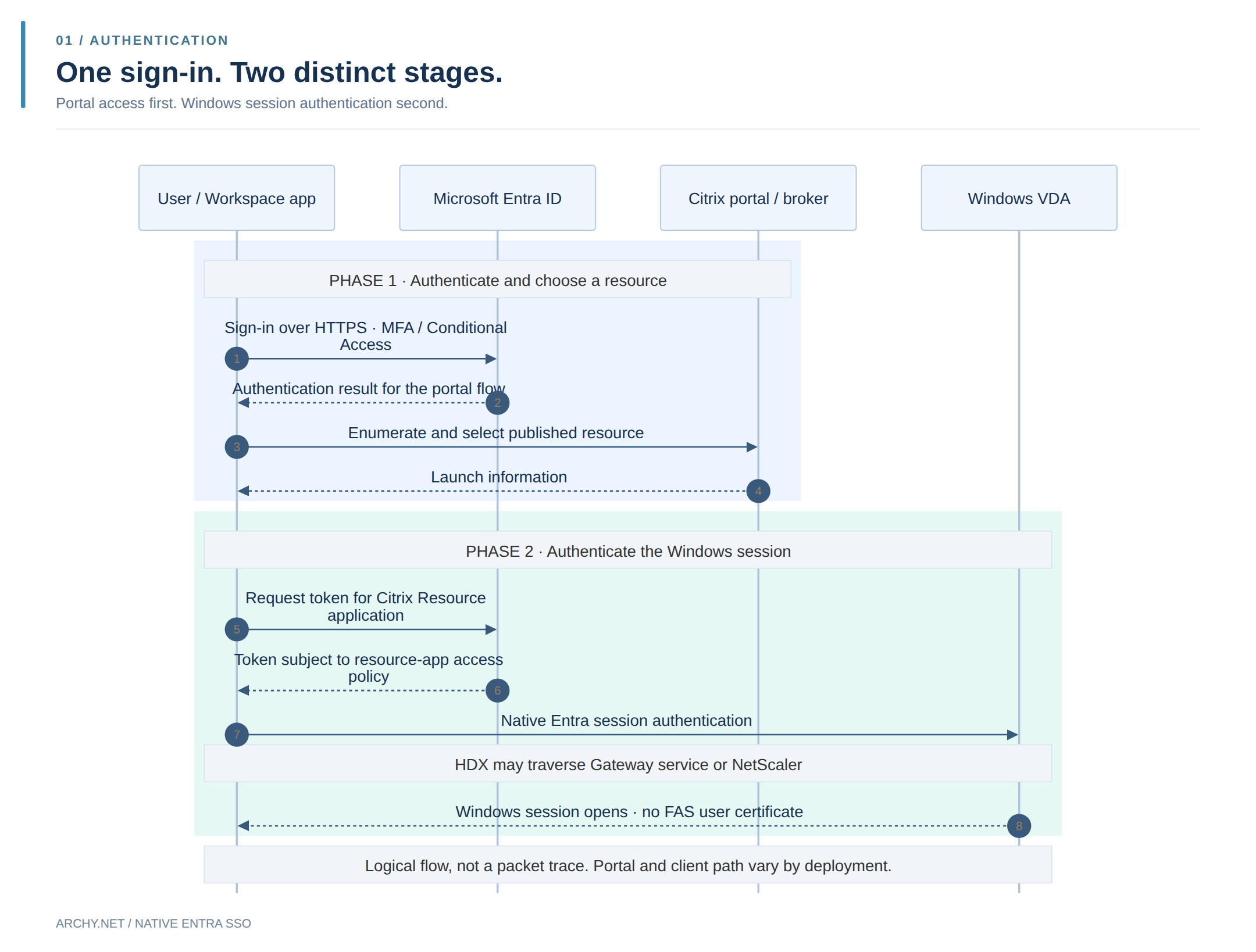
You sign in with Entra ID, complete MFA, click your Citrix desktop… and Windows asks for your password again. The first login worked. It just did not authenticate the Windows session.
Citrix Native Entra SSO closes that gap. On supported session hosts, Windows logon uses Entra authentication tokens instead of a user certificate issued through Citrix Federated Authentication Service (FAS). The interesting part is not simply one less prompt: it is one less certificate bridge to operate.
What changes without FAS?
FAS turns federated authentication into certificate-based Windows logon. It works, but adds a service, a certificate authority dependency and a trust chain to maintain. Native Entra SSO takes a different path: the Citrix client obtains the tokens needed to authenticate to Windows on a compatible VDA.
That distinction matters. SSO to Workspace or StoreFront is not the same as SSO into Windows. Native Entra SSO addresses the latter. MFA and Conditional Access still apply, and HTTPS certificates are still needed.
NetScaler still has a job
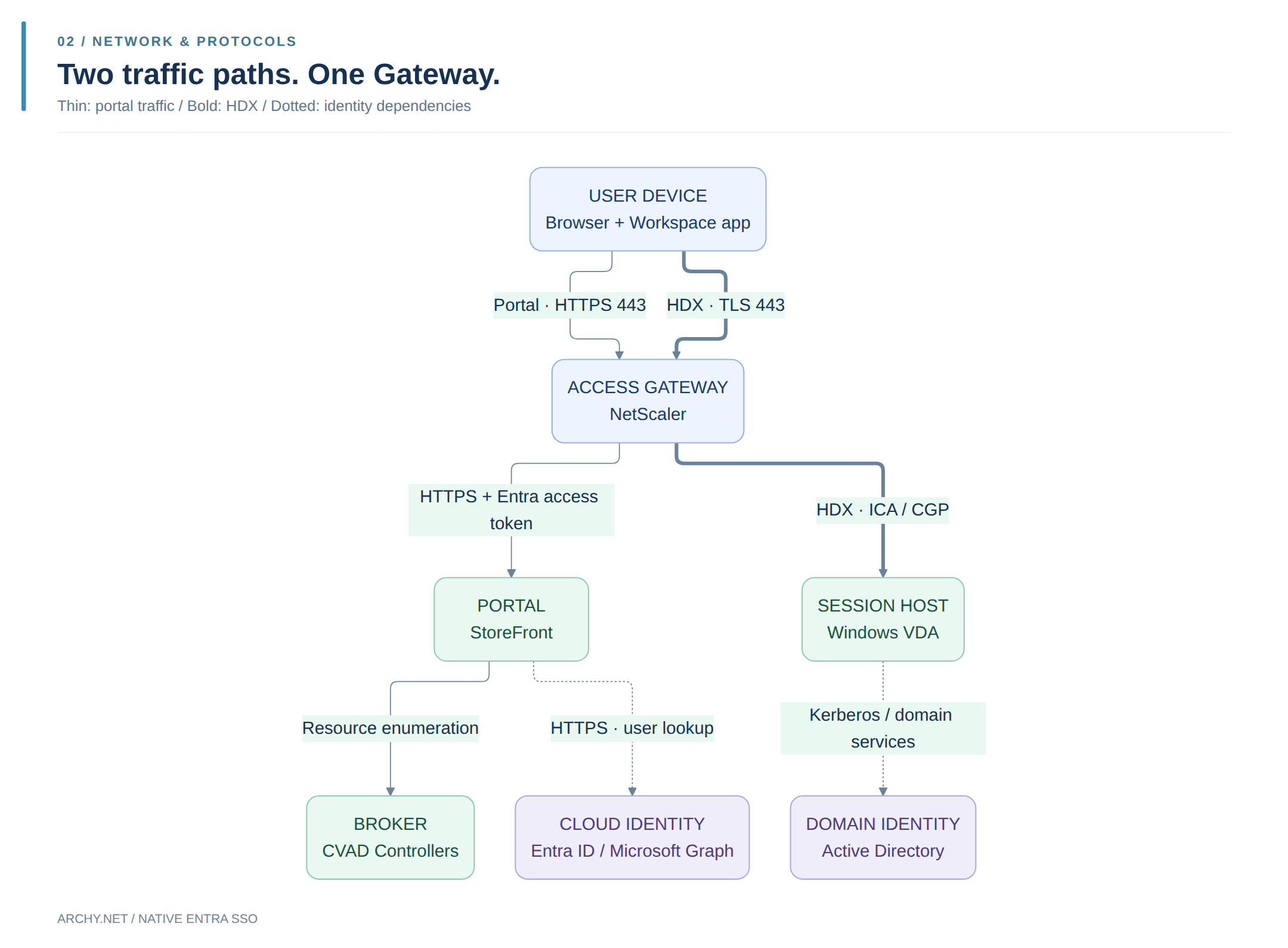
Removing FAS does not remove the gateway. NetScaler can continue carrying HDX while Windows authentication moves to Entra tokens. Transport and session logon are separate responsibilities.
In the documented NetScaler-to-StoreFront Entra OIDC integration, NetScaler forwards an Entra access token and StoreFront uses Microsoft Graph to identify the user. That is a specific integration, not something every existing SAML configuration gains automatically.
Less certificate plumbing, not zero configuration
The native flow needs resource and client applications in Entra, the Remote Desktop Services authentication protocol enabled on the resource, client approval, and the corresponding Citrix logon configuration. Apply session-logon Conditional Access policies to the Citrix Resource application; protecting the portal alone does not cover the same event.
Two user-facing details are easy to miss:
- Unlock is separate from sign-in. A passwordless launch does not guarantee a passwordless Windows unlock. Citrix Web sign-in has its own support requirements.
- Reconnect behavior changes. Auto Client Reconnect is disabled for this logon method; Session Reliability remains available. Browser launches and HTML5 access also need their own compatibility checks.
Can FAS finally go?
For sessions using a fully supported native Entra SSO path, FAS is no longer needed to issue Windows logon certificates. Across a mixed estate, older hosts or unsupported access paths may still need it. Coexistence makes more sense than forcing an all-or-nothing migration.
That is the real gain: removing a translation layer where the platform now supports a direct route. Check what Windows accepts at logon, not just whether the portal displays an Entra sign-in button.
References
Documentation reviewed on 17 October 2026. Check the current vendor matrices before deployment.